table标签的基本属性
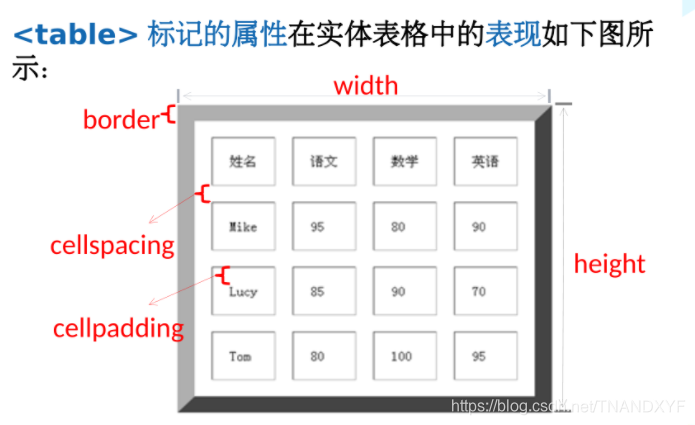
table标签的基本属性如下图所示:
| 属性名 | 含义 | 常用属性值 |
|---|---|---|
| border | 设置表格的边框(默认border=“0”) | 像素值 |
| cellspacing | 设置单元格与单元格边框之间的空白间距 | 像素值(默认为2像素) |
| cellpadding | 设置单元格内容与单元格边框之间的空白间距 | 像素值(默认为1像素) |
| width | 设置表格的宽度 | 像素值 |
| height | 设置表格的宽度 | 像素值 |
| align | 设置表格在网页中的水平对齐方式 | left、center、right |
| bgcolor | 设置表格的背景颜色 | 预定义的颜色值、十六进制#RGB、rgb(r,g,b) |
| background | 设置表格的背景图像 | url地址 |
 |
实例
边框样式
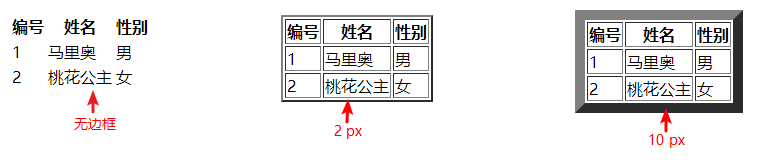
表格边框:在使用<table border="1"></table> 的方式来定义,其中:数字表示边框的宽度,单位为像素;以下举三个边框的例子;
<!--无边框-->
<table>
    <tr>
        <th>编号</th>
        <th>姓名</th>
        <th>性别</th>
    </tr>
    <tr>
        <td>1</td>
        <td>马里奥</td>
        <td>男</td>
    </tr>
    <tr>
        <td>2</td>
        <td>桃花公主</td>
        <td>女</td>
    </tr>
</table>
<br>
<!--边框宽度为2-->
<table border="2">
    <tr>
        <th> 编号 </th>
        <th>姓名</th>
        <th>性别</th>
    </tr>
    <tr>
        <td>1</td>
        <td>马里奥</td>
        <td>男</td>
    </tr>
    <tr>
        <td>2</td>
        <td>桃花公主</td>
        <td>女</td>
    </tr>
</table>
<br>
<!--边框宽度为10-->
<table border="10">
    <tr>
        <th> 编号 </th>
        <th>姓名</th>
        <th>性别</th>
    </tr>
    <tr>
        <td>1</td>
        <td>马里奥</td>
        <td>男</td>
    </tr>
    <tr>
        <td>2</td>
        <td>桃花公主</td>
        <td>女</td>
    </tr>
</table>
上述代码效果: