sass中流程控制包含四类,也是我们在js中常见的@if、@for、@each、@while。
1. @if
@if语法和js类似,基本格式是@if...@else if...@else。
1. 使用
`$theme:3;
.container {
    @if $theme >= 5 {
        background-color: red;
    }
    @else {
        background-color: blue;
    }
}`编译为css
.container {
    background-color: blue;
}
2. 案例
这里已一个利用mixin和if封装一个三角形生成,mixin知识后面又讲到。
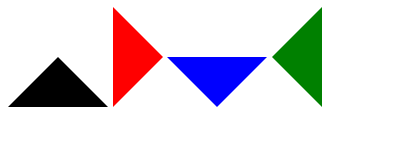
@mixin triangle($direction:top, $size:30px, $border-color:black) {
  width: 0px;
  height: 0px;
  display: inline-block;
  border-width: $size;
  border-#{$direction}-width: 0;
  @if ($direction==top) {
     border-color: transparent transparent $border-color transparent;
     border-style: dashed dashed solid dashed;
  }
  @else if($direction==right) {
     border-color: transparent transparent transparent $border-color;
     border-style: dashed dashed dashed solid;
  }
  @else if($direction==bottom) {
     border-color: $border-color transparent transparent transparent;
     border-style: solid dashed dashed dashed;
  }
  @else if($direction==left) {
     border-color: transparent $border-color transparent transparent;
     border-style: dashed solid dashed dashed;
  }
}
.p0 {
     @include triangle($size:50px);
}
.p1 {
     @include triangle(right, 50px, red);
}
.p2 {
    @include triangle(bottom, 50px, blue);
}
.p3 {
     @include triangle(left, 50px, green);
}
编译为
.p0 {
    width: 0px;
    height: 0px;
    display: inline-block;
    border-width: 50px;
    border-top-width: 0;
    border-color: transparent transparent black transparent;
    border-style: dashed dashed solid dashed;
}
.p1 {
    width: 0px;
    height: 0px;
    display: inline-block;
    border-width: 50px;
    border-right-width: 0;
    border-color: transparent transparent transparent red;
    border-style: dashed dashed dashed solid;
}
.p2 {
    width: 0px;
    height: 0px;
    display: inline-block;
    border-width: 50px;
    border-bottom-width: 0;
    border-color: blue transparent transparent transparent;
    border-style: solid dashed dashed dashed;
}
.p3 {
    width: 0px;
    height: 0px;
    display: inline-block;
    border-width: 50px;
    border-left-width: 0;
    border-color: transparent green transparent transparent;
    border-style: dashed solid dashed dashed;
}
2. @for
for在条件范围内重复操作,这个指令包含两种语法:
1. 语法:
@for $变量 from 开始 through 结束值;- 条件取值范围,左闭右闭
@for $变量 from 开始 to 结束值。- 条件取值范围,左闭右开
2. 说明:
$变量可以是任何变量,比如$i开始和结束值必须是整数值。- 步进为整数1
3. 案例:
@for $i from 1 through 3 {
  #loading span:nth-child(#{$i}) {
      width: 20 * ($i - 1) + px;
  }
}
编译为
#loading span:nth-child(1) {
    width: 0px;
}
#loading span:nth-child(2) {
    width: 20px;
}
#loading span:nth-child(3) {
    width: 40px;
}
3. @each
1. 语法:
@each $变量 in $列表类型的变量
$变量可以是任何变量名,比如$length或者$name$列表类型的变量是一连串的值,也就是值列表。
2. 实例:
$color-list:red green blue turquoise darkmagenta;
@each $color in $color-list {
    $index: index($color-list, $color);
    .p#{$index - 1} {
        background-color: $color;
    }
}
编译为
.p0 {
    background-color: red;
}
.p1 {
    background-color: green;
}
.p2 {
    background-color: blue;
}
.p3 {
    background-color: turquoise;
}
.p4 {
    background-color: darkmagenta;
}
4. @while
@while 指令循环输出直到表达式返回结果为 false。这样可以实现比@for 更复杂的循环。
1. 实例:
可以借此生成栅格化布局。
$column:12;
@while $column>0 {
   .col-sm-#{$column} {
      width: $column / 12 * 100%;
   }
    $column:$column - 1;
}
编译为
.col-sm-12 {
    width: 100%;
}
.col-sm-11 {
    width: 91.6666666667%;
}
.col-sm-10 {
    width: 83.3333333333%;
}
.col-sm-9 {
    width: 75%;
}
.col-sm-8 {
    width: 66.6666666667%;
}
.col-sm-7 {
    width: 58.3333333333%;
}
.col-sm-6 {
    width: 50%;
}
.col-sm-5 {
    width: 41.6666666667%;
}
.col-sm-4 {
    width: 33.3333333333%;
}
.col-sm-3 {
    width: 25%;
}
.col-sm-2 {
    width: 16.6666666667%;
}
.col-sm-1 {
    width: 8.3333333333%;
}