梗概
- 使用微力同步,使obsidian库的通用内容在电脑与手机中保持一致
- 用来同步手机和电脑通用部分
- 手机和电脑的差异化内容就不进行同步,只留在本地。而微力同步的忽略列表就能实现这一点。
图示
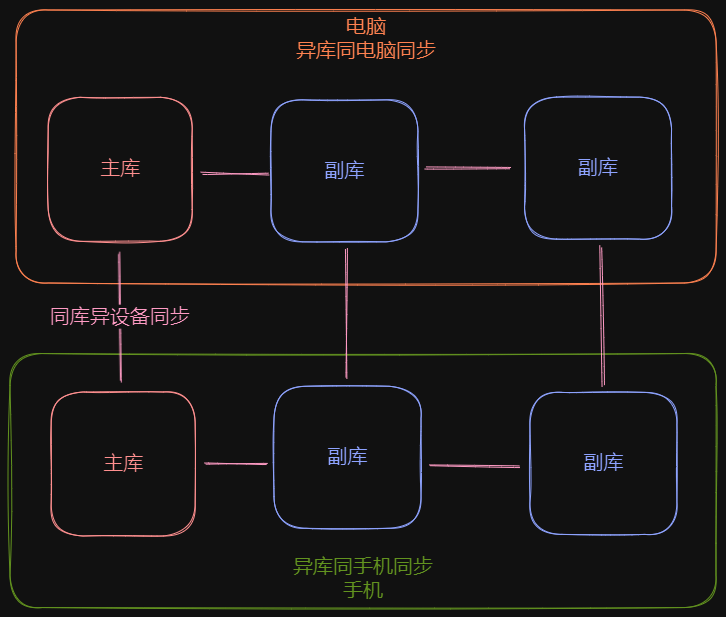
同步部署:
需要同步的内容配置:
电脑:
安装微力同步PC端
同库异设备同步
对于某一个库,按照以下添加过滤表即可 child::
指向原始笔记的链接# IgnoreList is a UTF-8 encoded .txt file that helps you specify single files, paths and rules # verysync.com # # # OS generated files # (?d)$RECYCLE.BIN (?d)$Recycle.Bin (?d)\#recycle (?d)System Volume Information (?d)*Zone.Identifier:$DATA (?i)(?d)lost+found (?d).sync (?d).DocumentRevisions-V100 (?d).TemporaryItems (?d).fseventsd (?d).iCloud (?d).DS_Store (?d).DS_Store? (?d).Spotlight-V100 (?d).Trashes (?d).Trash-* (?i)(?d)ehthumbs.db (?i)(?d)desktop.ini (?i)(?d)Thumbs.db (?d)!Icon[a-z] (?d)!Icon[0-9] (?d)!Icon- (?d)!Icon_ (?d)Icon? # btsync files (?d)*.bts (?d)*.!Sync (?d).SyncID (?d).SyncIgnore (?d).SyncArchive (?d)*.SyncPart (?d)*.SyncTemp (?d)*.SyncOld (?d)~* (?d)*~ (?d).~lock.* (?d)*.part (?d)*.filepart (?d).csync_journal.db (?d).csync_journal.db.tmp (?d)*.swn (?d)*.swp (?d)*.swo (?d).dropbox (?d).dropbox.attr (?d)*.crdownload (?d)@eaDir (?d)*@SynoResource (?d)@SynoResource (?d).@__thumb (?d).thumbnails (?d)._* (?d)*.baiduyun.downloading (?d)*.baiduyun.downloading.cfg (?d).baiduyun.uploading.cfg (?d)*.td (?d)*.WDSyncHistory (?d)*.!sync (?d)*.rsls (?d)*.tmp (?d)*.bt (?d)*.taobao.taobao_compv2 #FreeFileSync备份缓存文件 (?d)sync.ffs_* #同步冲突文件 (?d)*.sync-conflict-* # qql1 PC list (?d)sliding-panes-obsidian (?d)obsidian-auto-pair-chinese-symbol (?d)better-fn (?d)obsidian-codemirror-options (?d)easy-typing-obsidian (?d)obsidian-electron-window-tweaker (?d)hotkey-helper (?d)obsidian-image-toolkit (?d)mx-bili-plugin (?d)obsidian-outliner (?d)oz-image-plugin (?d)quick-explorer (?d)templater-obsidian (?d)better-word-count (?d)open-note-to-window-title (?d)obsidian-fullscreen-plugin (?d)obsidian-hotkeys-for-specific-files (?d)obsidian-shortcuts-for-starred-files (?d)obsidian-hotkeys-for-templates (?d)hotkeysplus-obsidian (?d)table-editor-obsidian (?d)calendar (?d)obsidian-citation-plugin (?d)oz-clear-unused-images (?d)discordian-plugin (?d)folder-note-plugin (?d)obsidian-hider (?d)obsidian-kanban (?d)obsidian-minimal-settings (?d)obsidian-sidebar-expand-on-hover (?d)vantage-obsidian (?d)darlal-switcher-plus (?d)mousewheel-image-zoom (?d)obsidian-core-search-assistant-plugin (?d)hot-reload (?d)obsidian-proxy-github-master (?d)obsidian-stille (?d).obsidian/appearance.json (?d).obsidian/community-plugins.json (?d).obsidian/app.json (?d)node_modules
异库同电脑同步
使用FreeFileSync软件
- 将多个库链式连接在一起 ^e66ceb
- 如A,B,C库,建立两个如下的同步项目: A←>B, B←>C
- 对每个同步项目,都配置如下过滤表:异库同电脑同步过滤表
手机:
- 安装并使用微力同步手机端
同库异设备同步
- 手机不用配置(但最好也配置),与电脑同步时已经被电脑的过滤表所过滤
异库同手机同步
使用foldersync软件 child::
Transclude of obsidian同步策略#^e66ceb
- 对每个同步项目,都配置如下过滤表:异库同手机同步过滤表
版本控制
微力同步 (只适用于其他设备删除的通用部分)
- 进入微力同步网页端中
- 设置回收站类型为时间回收站
- ^7a07e5
- 设置保留10天
- 确保手机端和电脑端都有设置!
快速临时部署
- child::快速配置手机与新电脑的obsidian库同步
实际问题
- child::微力同步疑似仍然会同步node_modules